How do I choose a text rendering algorithm between SDF, MSDF, Slug, Texture Atlas or Rive?
Text looks simple until you have to draw it yourself. A letter is not a picture, it is a set of outlines: closed loops of straight lines and Bezier curves, filled according to a winding rule. Drawing that on a CPU into a bitmap is a solved problem. Drawing it on a GPU, crisply, at any size, under any 3D transform, while the text changes every frame, is not. Most engines dodge the hard version by baking glyphs into textures ahead of time and living with the compromises.
In 2017 Eric Lengyel published an algorithm, called Slug, that stopped dodging. It renders glyphs directly from their outlines in the fragment shader, with no texture atlas and no per-frame tessellation. Lengyel patented it in 2019, and on March 17, 2026 he dedicated that patent to the public domain. That is why we built Slughorn, our C++20 implementation of the Slug technique, and it is why we can now talk about how it works and where it wins.
This is a tour of how GPU text rendering actually works, from the bitmap atlas up to Slug, and where each method fits.
What makes glyphs hard
Every scalable font stores each glyph as vector outlines. TrueType uses quadratic Bezier curves, OpenType with CFF uses cubic curves, and both mix in straight segments. The interior of the letter is whatever the fill rule says is inside, usually the nonzero winding rule: shoot a ray from the pixel, count how the outline crosses it, and if the winding number is nonzero the pixel is inside the glyph.
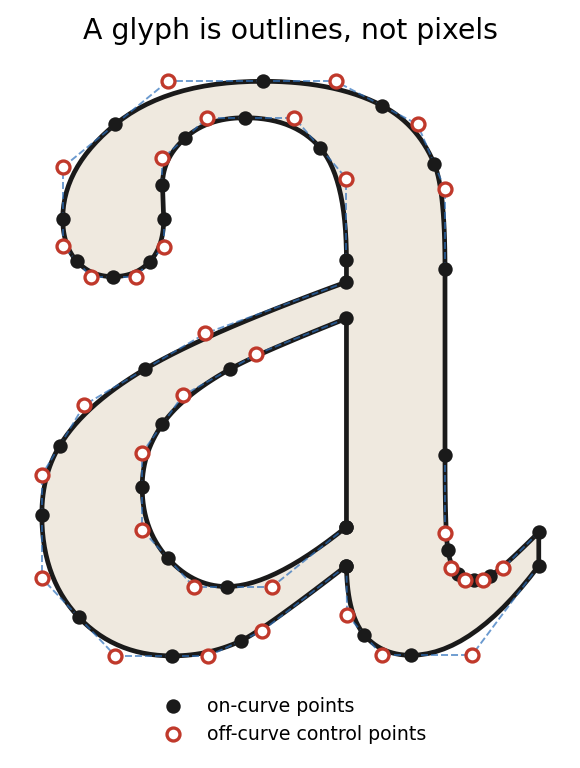
A glyph is a set of outlines, not pixels: filled dots are on-curve points, open circles are Bezier control points.
The renderer has to do three things at once and do them fast: fill the interior correctly, produce clean antialiased edges, and stay sharp whether the glyph is 8 pixels tall in a menu or filling the screen on a billboard rotated in perspective. On a CPU you rasterize each glyph once at its target size and you are done. On a GPU you want to draw thousands of glyphs per frame, at arbitrary scales, ideally without re-rasterizing anything. That constraint is where every technique below makes its trade.
Method 1: the texture atlas (bitmap glyphs)
The oldest and still most common approach. Rasterize each glyph once, at one size, into a shared texture called an atlas, then draw each on-screen character as a textured quad that samples its slot.
It is fast, trivially portable, and runs on anything with a texture unit. That is why it is everywhere.
The problems show up the moment you scale. Enlarge past the baked size and the glyph turns into blurry or blocky pixels, because you are magnifying a bitmap. Shrink it and you get shimmer and dropped stems unless you bake mip levels. Every size you want crisp is another atlas. Every language is another problem: a Latin atlas is small, but Chinese, Japanese, and Korean have tens of thousands of glyphs, and baking all of them at several sizes is a memory disaster. And a bitmap has no idea it is being viewed in perspective, so text laid onto a 3D surface looks soft.
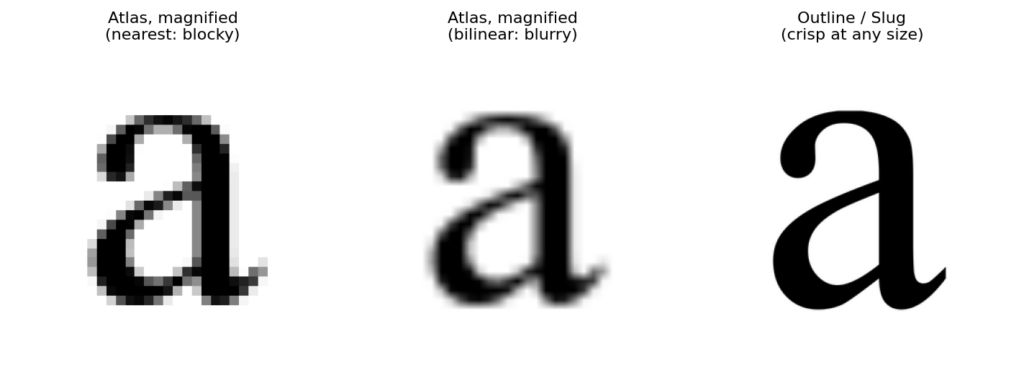
Magnifying a baked atlas glyph (left and center) versus rendering it from the outline (right).
Method 2: signed distance fields (SDF)
Valve introduced the fix that carried the industry for a decade. Chris Green's 2007 SIGGRAPH work, "Improved Alpha-Tested Magnification for Vector Textures and Special Effects," stores not the glyph's pixels but a signed distance field: each texel holds the distance to the nearest edge, positive inside, negative outside. In the shader you sample that field and threshold at zero. Because distance interpolates smoothly, you can scale a small SDF texture up dramatically and still get a clean edge, and you get cheap antialiasing by softening the threshold.
One small texture, resolution independent within reason, one cheap shader. For a long time this was the default for crisp UI text and game HUDs, and it still is on constrained hardware.
But an SDF is still a baked texture sampled at a fixed resolution, and it lies about corners. A sharp corner is a discontinuity in the distance field, and bilinear interpolation rounds it off. Every hard corner on a letter, the point of an "A", the notch of a "K", gets softened. Push the magnification far enough, or make the glyph small enough that the field is only a few texels wide, and thin stems break up and detail smears.
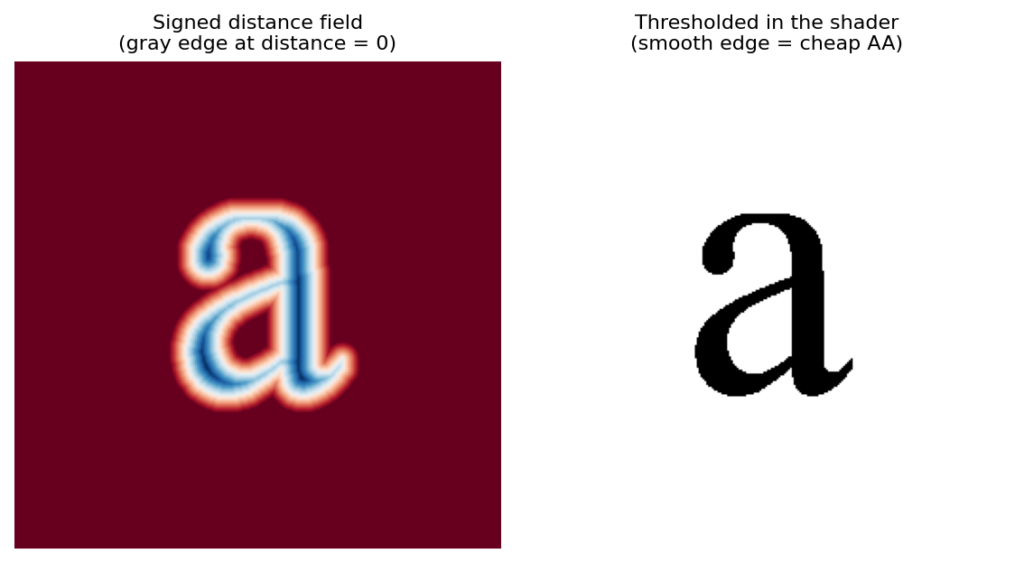
A signed distance field (left) and the crisp edge a shader recovers from it (right).
Method 3: multi-channel signed distance fields (MSDF)
Viktor Chlumsky's work, from his 2015 thesis and the 2018 paper "Improved Corners with Multi-Channel Signed Distance Fields," fixes the corner problem. Instead of one distance channel, MSDF stores three, in red, green, and blue, each encoding distance to a different subset of edges chosen so that sharp corners survive. In the shader you take the median of the three channels. The median trick reconstructs corners almost perfectly, so an MSDF glyph stays crisp at magnifications that would round an SDF to mush.
MSDF is the current sweet spot for a lot of teams, and Chlumsky's msdfgen is MIT licensed and widely adopted. If you need crisp scalable text and you are willing to bake an atlas, it is an excellent choice.
It is still an atlas, though, with the costs that implies. You bake each glyph at a chosen resolution ahead of time, so dynamic or user-supplied text, and enormous glyph sets like CJK, still mean baking pipelines and memory budgets. Generation is more expensive than plain SDF. At very small sizes you are still sampling too few texels to hold fine detail, and at extreme minification you still fight aliasing. The three-channel lookup costs more bandwidth than one. MSDF raises the ceiling on quality, but it still uses an atlas.
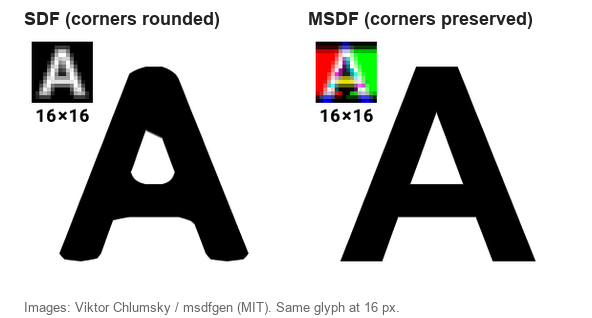
SDF rounds sharp corners; MSDF preserves them. Images: Viktor Chlumsky / msdfgen (MIT).
Method 4: tessellation and coverage (Loop-Blinn, NV_path_rendering, Pathfinder, Rive)
A different family skips textures entirely and turns the outline into geometry the GPU can rasterize.
- Loop-Blinn feeds curved triangles to the GPU and uses a per-pixel discard shader to keep only the inside of each quadratic Bezier, combined with the stencil buffer to resolve winding. Elegant, but reliable antialiasing is genuinely hard without tricks that cost quality.
- Stencil-then-cover, exposed as NVIDIA's NV_path_rendering extension, draws the path into the stencil buffer in one pass, then covers it in a second. It is high quality but leans on vendor extensions and specific hardware paths.
- Pathfinder tessellates edges into microtriangles, computes signed trapezoidal areas per pixel, and accumulates coverage in a compute pass. Tile-based and fast on modern GPUs.
- Rive's renderer, open-sourced in 2024, reduces antialiased vector paths into unique triangle patches and rasterizes them through a massively parallel pipeline with pixel local storage, hitting 120 fps on animated vector art.
This family is genuinely resolution-independent and, for animated designed vector graphics, often the right answer. Rive in particular is built for artwork that moves. The costs are the tessellation itself, which has to be redone when geometry changes, the geometry blowup for complex glyphs, the difficulty of clean analytic antialiasing, and in some cases a dependence on specific hardware features or extensions.
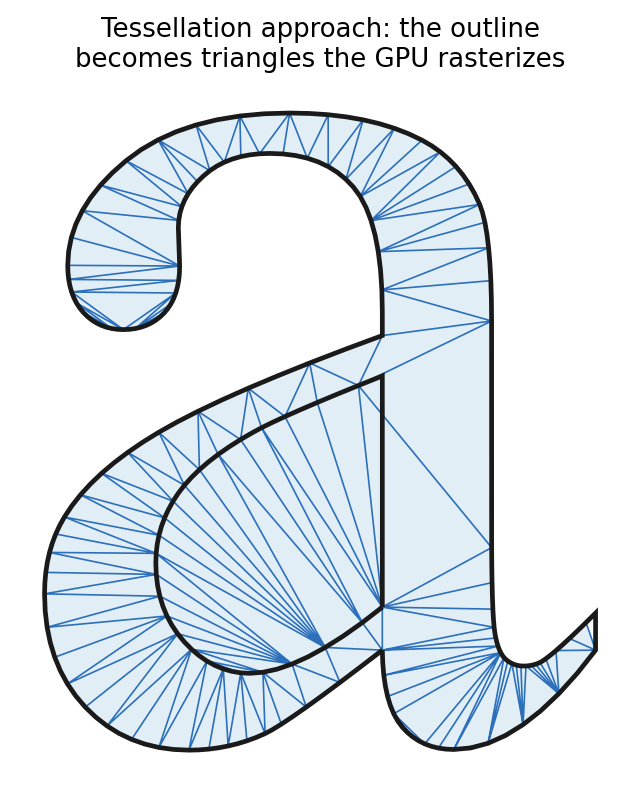
Tessellation methods turn the outline into triangles the GPU rasterizes.
Method 5: Slug, rendering straight from the outline
Slug skips the atlas and per-frame tessellation and keeps the glyph as a list of quadratic Bezier curves and line segments stored in a small GPU buffer. Alongside it, Slug builds a lightweight per-glyph acceleration structure that partitions the glyph into horizontal bands, so a given pixel only has to consider the handful of curves near it rather than the whole outline.
Then it resolves coverage directly in the fragment shader. For each pixel it effectively casts a ray, finds where that ray crosses the nearby Bézier curves, and counts those crossings to compute the winding number and therefore coverage. The hard part, and Lengyel's secret sauce, is a test he calls root eligibility: a precise rule for which curve-ray intersections should count, so the winding math is exact at the shared endpoints where curves meet and where naive approaches produce cracks or double-counts. Because the shader is solving the curve equations analytically rather than sampling a baked field, it produces exact coverage and clean antialiasing at any scale.
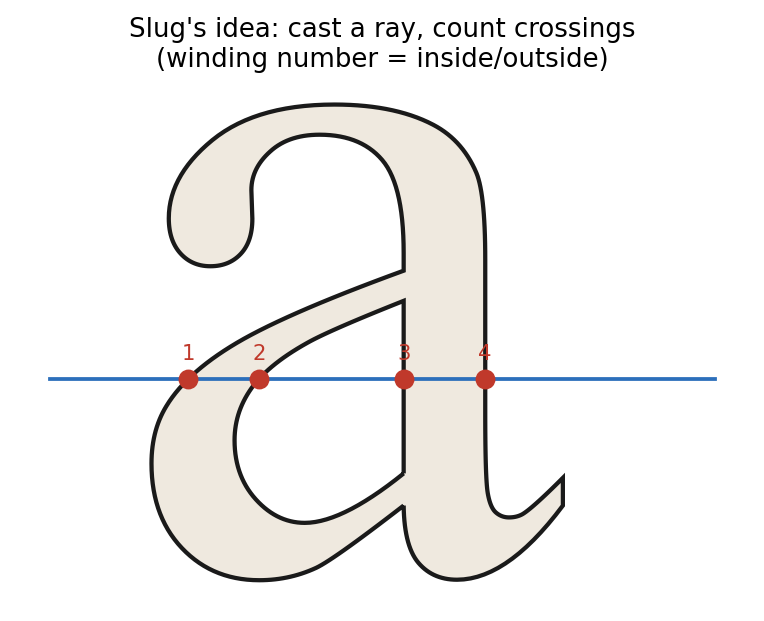
Slug’s core idea: for each pixel, cast a ray and count how many times it crosses the outline.
There is no baked resolution, so the same glyph is razor sharp at 6 pixels or 6000, and it stays sharp under arbitrary 2D and 3D transforms, including perspective, because coverage is computed per pixel after the transform. There is no atlas, so a hundred thousand CJK glyphs cost a font's worth of outline data, not an atlas the size of a video. Text can change every frame at no baking cost, which is exactly what you want for live data, user input, and localized content. And it all happens in a single draw with an ordinary fragment shader, no vendor extension required.
This is critical when you cannot predict how the text will be viewed. Atlas, SDF, and MSDF all bake a fixed resolution ahead of time, which quietly assumes a bounded range of on-screen sizes and viewing angles. When the relationship between the text plane and the camera is not known in advance, a free 3D camera, an arbitrary zoom, a close-up, or a steep off-axis grazing angle, those baked approximations break down: magnify past the baked resolution and the atlas blurs while SDF and MSDF round and smear, and at oblique angles the sampled field aliases. You cannot pre-allocate enough resolution for every possible view without the storage exploding. Slug computes coverage analytically, per pixel, after the transform, so it stays exact no matter how close, how far, or how oblique the viewer gets, with nothing baked and no ceiling to hit. Tessellation is the only other family that shares this, and it pays for it in tessellation cost and harder antialiasing. That is why Slughorn is the one to reach for in interactive 3D, AR and VR, flythroughs, moving HUDs, and CAD or digital-twin navigation, where you do not get to decide in advance how close or how oblique the viewer will be.
Seeing the difference
We rendered the same capital R with Slughorn (our osgSlug integration) next to the alternatives you would actually reach for: a single-channel SDF, an MSDF, Rive's renderer, and osgText's bitmap along with its bitmap-derived SDF. Every texture-based panel got the same budget, 64 texels per em, so what separates them is technique, not resolution.
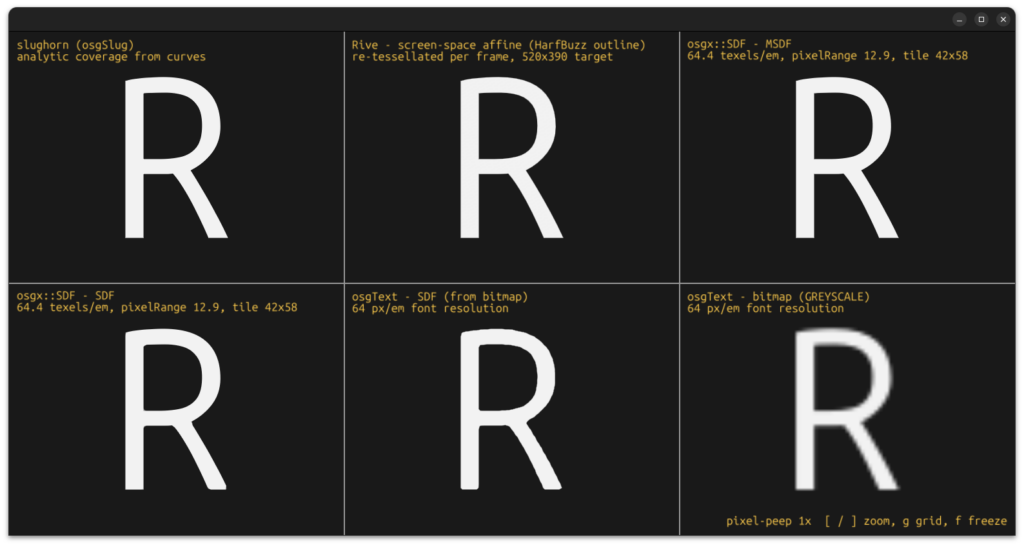
Straight on at their baked size, five of the six are practically identical: Slughorn, Rive, and MSDF reproduce the outline, and the single-channel SDFs differ only by slightly rounded corners at the foot of the leg. The outlier is the osgText bitmap, a 64 px/em image magnified about four times, which cannot recover detail it never stored.
Tilt the glyph into perspective and the picture changes.
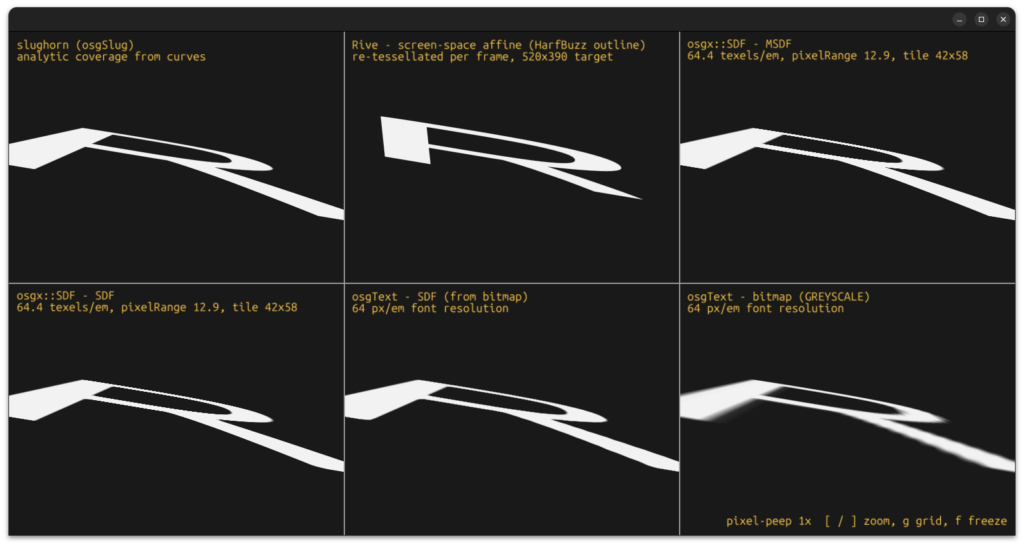
In grazing perspective, Slughorn and the three distance-field panels keep the R in place with clean edges, because they compute coverage per pixel inside the glyph’s own plane, so the projection costs them nothing. The osgText bitmap blurs as it recedes. Rive’s R is the wrong shape: its renderer only accepts 2D affine transforms, and a perspective projection is not affine, so the best it can do is an approximation that is exact at the center and drifts toward the edges.
Now zoom in on a single edge.
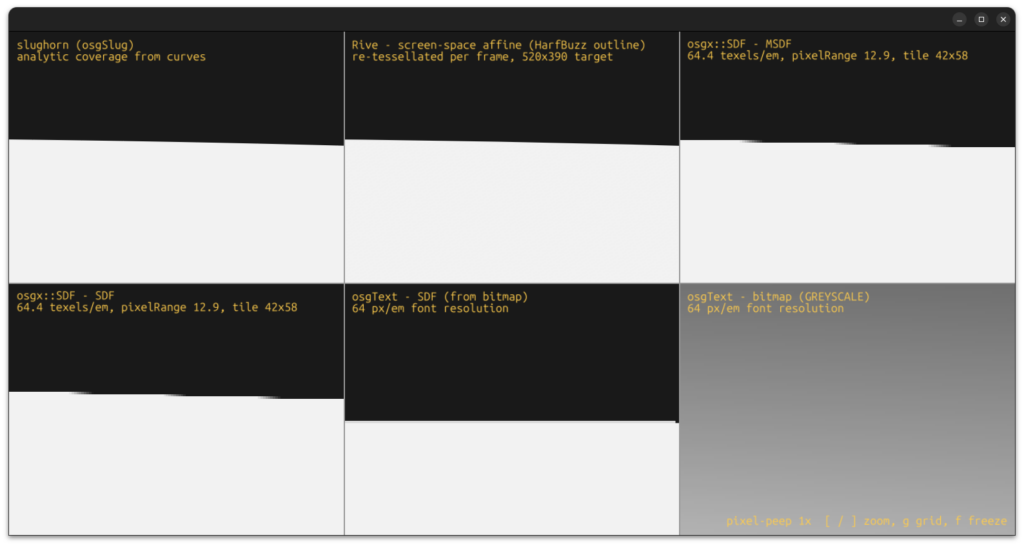
At extreme magnification, only the curve-based renderers, Slughorn and Rive, still produce a straight, clean edge, because both work from the actual outline at whatever size it is shown (Rive by re-tessellating every frame for this view). The distance-field panels notch, where interpolating between stored samples no longer matches the true curve. The osgText bitmap has dissolved into a single grey gradient, because each of its texels now covers a large part of the panel.
A note on fairness, because the technical reader will ask. Every texture-based method here used the same 64 texels per em, and giving them more pushes these artifacts back without removing them. The SDF and MSDF panels use default bake settings, and MSDF's error-correction options would soften some of the notches in the last image. Rive is shown at its best for these views, rendered through the camera every frame, which is more generous than how it is usually embedded in a 3D scene, where it would be drawn into a texture and mapped onto the surface, avoiding the distortion but blurring the way the bitmap does.
Head to head
| Concern | Bitmap atlas | SDF | MSDF | Tessellation / Rive | Slug |
|---|---|---|---|---|---|
| Sharp at any scale | No | Partly | Mostly | Yes | Yes |
| Sharp corners | Yes at bake size | No | Yes | Yes | Yes |
| Tiny sizes | Bake per size | Weak | Better | Good | Good |
| Memory for large glyph sets (CJK) | Very high | High | High | Low | Moderate |
| Dynamic / changing text | Rebake | Rebake | Rebake | Re-tessellate | Free |
| 3D and perspective | Soft | OK | OK | Good | Excellent |
| Heavily animated vector art | No | No | No | Excellent (Rive) | Good |
| Runs on low-end / old GPUs | Excellent | Excellent | Good | Varies | Needs a capable shader stage |
| Implementation complexity | Low | Low | Medium | High | Medium to high |
Pale green marks where Slug is the best or a tied-best choice.
So which one should you use
There is no single winner, there is a right tool per job.
- Reach for Slug(horn) when you need text that is crisp at every scale and under 3D and perspective (VR/AR/xR), when you have huge or dynamic glyph sets, when the text changes constantly, or when you are rendering mixed vector UI into a real-time pipeline. This is GIS glass cockpits, visual simulation labels, space domain displays, AR overlays, and any interface that has to stay legible while it moves. This is why we built Slughorn.
- Reach for MSDF when you want crisp scalable text, you can bake an atlas up front, and you are happy on a broad range of hardware. It is a great default for simpler game HUDs and app UI.
- Reach for plain SDF when the hardware is constrained, the text is fairly static, and you can live with softened corners.
- Reach for a bitmap atlas when the text is a fixed size on a fixed UI and you want the simplest, most portable thing that works.
- Reach for Rive or a tessellation renderer when the job is designed vector artwork that animates, not primarily text.
But wait, there's more

We keep saying text because text is where Slug earned its name, but Slughorn draws anything you can express as filled and stroked vector geometry, from any of its backends. That means full SVG with gradients, layered shaders, and animation within layers, and it holds up at map-cartography scale, drawing labels and linework at clarity and resolution the pre-baked approaches cannot reach. There is a lot more we will be demonstrating soon. For the features we have not called out here, see the Slughorn repository on GitHub.
Tooting Slughorn's horn
Slughorn is our implementation of the Slug technique in modern C++20. It does the heavy work once, at build time, so there is no runtime tessellation: the outline data and band structure are prepared ahead of time and the shader just evaluates coverage. And while text is where Slug made its name, Slughorn doesn't treat glyphs specially: a glyph is just a popular shape. Anything you can describe as vector paths renders through the same pipeline, with the same quality. It ingests the formats you already use, including SVG, FreeType fonts, and paths from Blend2D, Cairo, and Skia, and it exposes a native Canvas-style API for authoring shapes directly, with fills, strokes, and gradients composited into a single GPU-ready atlas of outline data. It targets OpenGL, Vulkan, WebGPU, and DirectX, and ships with Python bindings alongside the C++ API, so the same rendering works from an embedded HUD to a full 3D scene.
Credit where it is due: the Slug algorithm is Eric Lengyel's, published in the Journal of Computer Graphics Techniques and, since March 2026, free for anyone to implement. We think it is the right foundation for correct, resolution-independent text on the GPU, and Slughorn is our take on making it easy to use.
If you are fighting blurry labels in a 3D scene, an atlas that will not fit your glyph set, or text that has to stay crisp while it moves, that is exactly the kind of problem we solve. Contact us to talk about Slughorn or to put it to work in your pipeline.
References
- Eric Lengyel, "GPU-Centered Font Rendering Directly from Glyph Outlines," Journal of Computer Graphics Techniques, vol. 6, no. 2, 2017.
- Eric Lengyel, "A Decade of Slug" (Slug patent dedicated to the public domain, March 2026), terathon.com.
- Chris Green, "Improved Alpha-Tested Magnification for Vector Textures and Special Effects," Valve, SIGGRAPH 2007.
- Viktor Chlumsky, "Shape Decomposition for Multi-Channel Distance Fields" (thesis, 2015) and "Improved Corners with Multi-Channel Signed Distance Fields," Computer Graphics Forum, 2018. msdfgen is MIT licensed.
- Rive, "Rive Renderer, now open source and available on all platforms," 2024.
- servo/pathfinder project and its "Related approaches" documentation.
Frequently asked questions
What is the difference between texture-atlas, SDF, MSDF, and Slug text rendering?
A texture atlas stores each glyph as a baked bitmap, so it blurs once you scale past its baked size. SDF (signed distance field) stores distance-to-edge instead, which scales better but rounds sharp corners. MSDF adds channels so corners stay crisp, but it is still a baked atlas at a chosen resolution. Slug skips the atlas and computes coverage from the glyph's actual Bezier outline in the shader, so it stays exact at any size or angle.
Why does text go blurry when I scale or tilt it in 3D?
Because most engines draw text from a pre-baked bitmap atlas. Magnify past the baked resolution, tilt it in perspective, or wrap it onto a surface, and you are stretching a fixed grid of pixels, so the edges soften. Outline-based methods like Slug avoid this because coverage is computed per pixel after the transform.
What is the Slug algorithm?
Slug is a technique published by Eric Lengyel in 2017 that renders glyphs directly from their quadratic Bezier outlines on the GPU, with no texture atlas and no per-frame tessellation. A fragment shader casts a ray per pixel and counts curve crossings to get exact coverage, using Lengyel's “root eligibility” test for correctness where curves meet.
Is the Slug technique free to use now?
Yes. Lengyel dedicated the Slug patent to the public domain in March 2026, so anyone can implement the technique. AlphaPixel's Slughorn is a C++20, MIT-licensed implementation of it.
When should I use MSDF instead of Slug?
When you can bake an atlas up front, your text is fairly static, and you want one cheap shader that runs on a wide range of hardware. MSDF is a strong default for game HUDs and app UI. Slug wins when text must stay crisp at any scale and angle, when glyph sets are huge or dynamic, or when the camera relationship is unbounded.
Does Slug handle large glyph sets like Chinese, Japanese, and Korean?
Yes, and without the atlas-memory explosion. Because Slug stores outline data instead of baked bitmaps, tens of thousands of CJK glyphs cost a font's worth of curve data rather than a giant multi-size texture. In Slughorn the per-glyph band structure adds moderate overhead, still well below a CJK atlas.
How is Slughorn related to Slug?
Slug is the algorithm (Lengyel's); Slughorn is AlphaPixel's library that implements it. Slughorn feeds any GPU API (OpenGL, Vulkan, WebGPU, Direct3D) and draws any filled and stroked vector geometry, not just text.